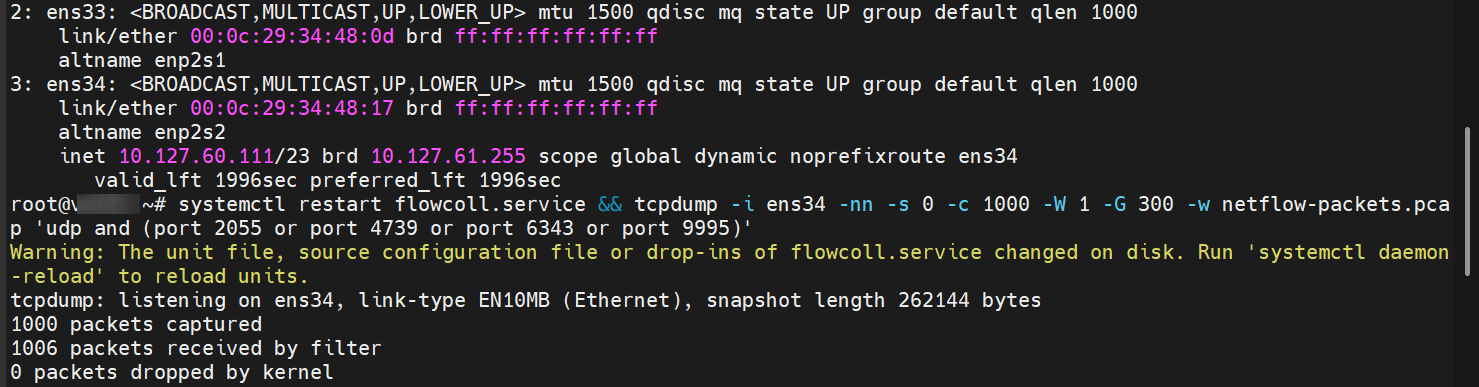
Hi Everyone, i’m newer to flowcoll, i getting a problem when start the flowcoll progress. The elk look only receive totally 256 flow record everytime the flowcoll service start. I’m have try 8C16G, 16C32G for my ubuntu 2404 system, but the phenomenon still same. I have install the basic license for the flowcoll.
How can i continue check, if anyone could point it out it will be really appreciate!
On the Kibana, i can see 2 time of 256 record for sflow after i mannually restart the flowcoll service twice.

tail -f /var/log/elastiflow/flowcoll/flowcoll.log
{“level”:“info”,“ts”:“2025-11-12T10:07:26.705Z”,“logger”:“flowcoll.elasticsearch_output[default]”,“caller”:“httpoutput/healthcheck_runner.go:70”,“msg”:“healthcheck success; connection is available”,“address”:“x.x.x.x:9200”}
{“level”:“info”,“ts”:“2025-11-12T10:07:32.884Z”,“logger”:“flowcoll”,“caller”:“metrics/queuegauge.go:88”,“msg”:“flow processor to output writer is 90% full. This is normal when the collector is starting. If it persists for hours, it may indicate that you are at your license threshold or your system is under-resourced.”}
{“level”:“info”,“ts”:“2025-11-12T10:07:52.884Z”,“logger”:“flowcoll”,“caller”:“metrics/queuegauge.go:88”,“msg”:“flow processor to output writer is 90% full. This is normal when the collector is starting. If it persists for hours, it may indicate that you are at your license threshold or your system is under-resourced.”}
{“level”:“info”,“ts”:“2025-11-12T10:07:56.702Z”,“logger”:“flowcoll.monitor_pool”,“caller”:“monitor/pool.go:54”,“msg”:“Monitor Output: decoding rate: 8 records/second”}
{“level”:“info”,“ts”:“2025-11-12T10:08:12.885Z”,“logger”:“flowcoll”,“caller”:“metrics/queuegauge.go:88”,“msg”:“flow processor to output writer is 90% full. This is normal when the collector is starting. If it persists for hours, it may indicate that you are at your license threshold or your system is under-resourced.”}
{“level”:“info”,“ts”:“2025-11-12T10:08:26.702Z”,“logger”:“flowcoll.monitor_pool”,“caller”:“monitor/pool.go:54”,“msg”:“Monitor Output: decoding rate: 0 records/second”}
{“level”:“info”,“ts”:“2025-11-12T10:08:32.885Z”,“logger”:“flowcoll”,“caller”:“metrics/queuegauge.go:88”,“msg”:“flow processor to output writer is 90% full. This is normal when the collector is starting. If it persists for hours, it may indicate that you are at your license threshold or your system is under-resourced.”}
{“level”:“info”,“ts”:“2025-11-12T10:08:52.885Z”,“logger”:“flowcoll”,“caller”:“metrics/queuegauge.go:88”,“msg”:“flow processor to output writer is 90% full. This is normal when the collector is starting. If it persists for hours, it may indicate that you are at your license threshold or your system is under-resourced.”}
{“level”:“info”,“ts”:“2025-11-12T10:08:56.702Z”,“logger”:“flowcoll.monitor_pool”,“caller”:“monitor/pool.go:54”,“msg”:“Monitor Output: decoding rate: 0 records/second”}
{“level”:“info”,“ts”:“2025-11-12T10:09:12.884Z”,“logger”:“flowcoll”,“caller”:“metrics/queuegauge.go:88”,“msg”:“flow processor to output writer is 90% full. This is normal when the collector is starting. If it persists for hours, it may indicate that you are at your license threshold or your system is under-resourced.”}
{“level”:“info”,“ts”:“2025-11-12T10:09:26.702Z”,“logger”:“flowcoll.monitor_pool”,“caller”:“monitor/pool.go:54”,“msg”:“Monitor Output: decoding rate: 0 records/second”}
{“level”:“info”,“ts”:“2025-11-12T10:09:32.885Z”,“logger”:“flowcoll”,“caller”:“metrics/queuegauge.go:88”,“msg”:“flow processor to output writer is 90% full. This is normal when the collector is starting. If it persists for hours, it may indicate that you are at your license threshold or your system is under-resourced.”}
{“level”:“info”,“ts”:“2025-11-12T10:09:52.885Z”,“logger”:“flowcoll”,“caller”:“metrics/queuegauge.go:88”,“msg”:“flow processor to output writer is 90% full. This is normal when the collector is starting. If it persists for hours, it may indicate that you are at your license threshold or your system is under-resourced.”}
{“level”:“info”,“ts”:“2025-11-12T10:09:56.702Z”,“logger”:“flowcoll.monitor_pool”,“caller”:“monitor/pool.go:54”,“msg”:“Monitor Output: decoding rate: 0 records/second”}
more /etc/elastiflow/flowcoll.yml
EF_LOGGER_LEVEL: ‘info’
EF_LOGGER_ENCODING: ‘json’
EF_LOGGER_FILE_LOG_ENABLE: true
EF_LOGGER_FILE_LOG_FILENAME: ‘/var/log/elastiflow/flowcoll/flowcoll.log’
EF_LOGGER_FILE_LOG_MAX_SIZE: 100
EF_LOGGER_FILE_LOG_MAX_AGE: 7
EF_LOGGER_FILE_LOG_MAX_BACKUPS: 4
EF_LOGGER_FILE_LOG_COMPRESS: false
EF_LICENSE_ACCEPTED: true
EF_ACCOUNT_ID: “xxxx”
#EF_LICENSE_FLOW_RECORDS_PER_SECOND: 4000
EF_LICENSE_KEY: “”
EF_INSTANCE_NAME: xxxx
EF_API_IP: 0.0.0.0
EF_API_PORT: 8080
EF_API_TLS_ENABLE: false
#EF_API_TLS_CERT_FILEPATH:
#EF_API_TLS_KEY_FILEPATH:
#EF_API_BASIC_AUTH_ENABLE: false
#EF_API_BASIC_AUTH_USERNAME:
#EF_API_BASIC_AUTH_PASSWORD:
EF_FLOW_SERVER_UDP_IP: 10.x.x.x
EF_FLOW_SERVER_UDP_PORT: 6343,9995
EF_FLOW_SERVER_UDP_READ_BUFFER_MAX_SIZE: 33554432
EF_FLOW_PACKET_STREAM_MAX_SIZE: 8192
#EF_INPUT_FLOW_BENCHMARK_ENABLE: false
#EF_INPUT_FLOW_BENCHMARK_PACKET_FILEPATH: /etc/elastiflow/benchmark/flow/packets.txt
EF_PROCESSOR_DECODE_IPFIX_ENABLE: false
EF_PROCESSOR_DECODE_NETFLOW1_ENABLE: false
EF_PROCESSOR_DECODE_NETFLOW5_ENABLE: false
EF_PROCESSOR_DECODE_NETFLOW6_ENABLE: false
EF_PROCESSOR_DECODE_NETFLOW7_ENABLE: false
EF_PROCESSOR_DECODE_NETFLOW9_ENABLE: false
EF_PROCESSOR_DECODE_SFLOW5_ENABLE: true
#EF_PROCESSOR_DECODE_SFLOW_FLOWS_ENABLE: true
#EF_PROCESSOR_DECODE_SFLOW_FLOWS_KEEP_SAMPLES: true
#EF_PROCESSOR_DECODE_SFLOW_COUNTERS_ENABLE: true
EF_PROCESSOR_DECODE_MAX_RECORDS_PER_PACKET: 8192
EF_PROCESSOR_ENRICH_ASN_PREF: flow
EF_PROCESSOR_ENRICH_JOIN_ASN: true
EF_PROCESSOR_ENRICH_JOIN_GEOIP: true
EF_PROCESSOR_ENRICH_JOIN_SUBNETATTR: true
EF_PROCESSOR_ENRICH_JOIN_SEC: true
EF_PROCESSOR_EXPAND_CLISRV: true
EF_PROCESSOR_EXPAND_CLISRV_NO_L4_PORTS: true
#EF_PROCESSOR_IFA_ENABLE: false
#EF_PROCESSOR_IFA_WORKER_SIZE: 4000
EF_PROCESSOR_ENRICH_APP_ID_ENABLE: true
EF_PROCESSOR_ENRICH_APP_ID_PATH: /etc/elastiflow/app/appid.yml
EF_PROCESSOR_ENRICH_APP_ID_TTL: 7200
EF_PROCESSOR_ENRICH_APP_IPPORT_ENABLE: false
EF_PROCESSOR_ENRICH_APP_IPPORT_PATH: /etc/elastiflow/app/ipport.yml
EF_PROCESSOR_ENRICH_APP_IPPORT_TTL: 7200
EF_PROCESSOR_ENRICH_APP_IPPORT_PRIVATE: true
EF_PROCESSOR_ENRICH_APP_IPPORT_PUBLIC: false
EF_PROCESSOR_ENRICH_APP_REFRESH_RATE: 15
EF_PROCESSOR_ENRICH_IPADDR_DNS_ENABLE: false
EF_PROCESSOR_ENRICH_IPADDR_DNS_NAMESERVER_IP: 8.8.8.8
EF_PROCESSOR_ENRICH_IPADDR_DNS_NAMESERVER_TIMEOUT: 3000
EF_PROCESSOR_ENRICH_IPADDR_DNS_RESOLVE_PRIVATE: true
EF_PROCESSOR_ENRICH_IPADDR_DNS_RESOLVE_PUBLIC: true
EF_PROCESSOR_ENRICH_IPADDR_DNS_USERDEF_PATH: /etc/elastiflow/hostname/user_defined.yml
EF_PROCESSOR_ENRICH_IPADDR_DNS_USERDEF_REFRESH_RATE: 15
EF_PROCESSOR_ENRICH_IPADDR_DNS_INCLEXCL_PATH: /etc/elastiflow/hostname/incl_excl.yml
EF_PROCESSOR_ENRICH_IPADDR_DNS_INCLEXCL_REFRESH_RATE: 15
EF_PROCESSOR_ENRICH_IPADDR_MAXMIND_ASN_ENABLE: true
EF_PROCESSOR_ENRICH_IPADDR_MAXMIND_ASN_PATH: /etc/elastiflow/maxmind/GeoLite2-ASN.mmdb
EF_PROCESSOR_ENRICH_IPADDR_MAXMIND_GEOIP_ENABLE: true
EF_PROCESSOR_ENRICH_IPADDR_MAXMIND_GEOIP_PATH: /etc/elastiflow/maxmind/GeoLite2-City.mmdb
EF_PROCESSOR_ENRICH_IPADDR_MAXMIND_GEOIP_VALUES: city,country,country_code,location,timezone
EF_PROCESSOR_ENRICH_IPADDR_MAXMIND_GEOIP_LANG: en
EF_PROCESSOR_ENRICH_IPADDR_MAXMIND_GEOIP_INCLEXCL_PATH: /etc/elastiflow/maxmind/incl_excl.yml
EF_PROCESSOR_ENRICH_IPADDR_MAXMIND_GEOIP_INCLEXCL_REFRESH_RATE: 15
EF_PROCESSOR_ENRICH_NETIF_FLOW_OPTIONS_ENABLE: true
EF_FLOW_DATA_PATH: /var/lib/elastiflow/flowcoll
EF_PROCESSOR_ENRICH_SAMPLERATE_CACHE_SIZE: 65535
#EF_PROCESSOR_ENRICH_SAMPLERATE_USERDEF_ENABLE: false
#EF_PROCESSOR_ENRICH_SAMPLERATE_USERDEF_PATH: /etc/elastiflow/settings/sample_rate.yml
#EF_PROCESSOR_ENRICH_SAMPLERATE_USERDEF_OVERRIDE: false
EF_PROCESSOR_POOL_SIZE: 32
EF_PROCESSOR_TRANSLATE_KEEP_IDS: all
EF_PROCESSOR_DURATION_PRECISION: ms
#EF_PROCESSOR_DROP_FIELDS:
EF_OUTPUT_MONITOR_ENABLE: true
EF_OUTPUT_MONITOR_INTERVAL: 30
EF_OUTPUT_ELASTICSEARCH_ENABLE: true
EF_OUTPUT_ELASTICSEARCH_ECS_ENABLE: true
EF_OUTPUT_ELASTICSEARCH_BATCH_DEADLINE: 2000
EF_OUTPUT_ELASTICSEARCH_BATCH_MAX_BYTES: 8388608
EF_OUTPUT_ELASTICSEARCH_TIMESTAMP_SOURCE: collect #default is [end]
EF_OUTPUT_ELASTICSEARCH_INDEX_PERIOD: rollover
#EF_OUTPUT_ELASTICSEARCH_TSDS_ENABLE:
EF_OUTPUT_ELASTICSEARCH_INDEX_SUFFIX: szho-elastiflow
EF_OUTPUT_ELASTICSEARCH_INDEX_TEMPLATE_ENABLE: true
#EF_OUTPUT_ELASTICSEARCH_INDEX_TEMPLATE_OVERWRITE: false
EF_OUTPUT_ELASTICSEARCH_INDEX_TEMPLATE_SHARDS: 3
EF_OUTPUT_ELASTICSEARCH_INDEX_TEMPLATE_REPLICAS: 1
EF_OUTPUT_ELASTICSEARCH_INDEX_TEMPLATE_REFRESH_INTERVAL: 20s
EF_OUTPUT_ELASTICSEARCH_ADDRESSES: x.x.x.x:9200
EF_OUTPUT_ELASTICSEARCH_USERNAME: yyyyy
EF_OUTPUT_ELASTICSEARCH_PASSWORD: zzzzz
#EF_OUTPUT_ELASTICSEARCH_TLS_ENABLE: false
#EF_OUTPUT_ELASTICSEARCH_TLS_SKIP_VERIFICATION: false
#EF_OUTPUT_ELASTICSEARCH_TLS_CA_CERT_FILEPATH:
#EF_OUTPUT_ELASTICSEARCH_DROP_FIELDS: